
This article covers the MX DNS record type in detail. For a general guide to DNS records and how to set them up in the Customer Administration, see the article DNS – Domain Records.
In this article you will learn:
- When to Use This Guide
- What MX Records Are For
- How to Find MX Mail Server Addresses
- How to Enter MX Records Correctly
- Examples of MX Record Usage
- Common Problems
- Frequently Asked Questions
When to Use This Guide
- You have created a mailbox and emails are sent from it, but none arrive. See Mail Is Not Arriving.
- Mail stopped arriving after a DNS edit (for example because of a mailing service). See Mail Stopped Arriving After a DNS Edit.
- When saving, the system reports “Invalid MX record value”. See Cannot Save an MX Record.
- You want to use the email of Webhosting, WebSite or VEDOS Mailhosting and need to know their MX records. See Finding the Addresses of MX Mail Servers.
- Your mail is with another provider (for example an e-shop) and you do not know which MX records to enter. See Frequently Asked Questions.
What MX Records Are For
You use MX records to specify the domain addresses of the servers that process incoming email. You usually want several such servers so that another one can cover for an outage of one. Most email service providers offer 2-3 addresses for MX records. By entering all of your provider’s MX records and adding an SPF record you will do the most to keep your mail flowing smoothly.
Create a separate record for each MX mail server address.
If you are dealing with a problem where emails are sent but not received, the cause may be a missing or incorrectly entered MX record.
Finding the Addresses of MX Mail Servers
WEDOS provides email services with Webhosting and the WebSite service (except the Free variant) and separately as the Mailhosting.
Webhosting and WebSite
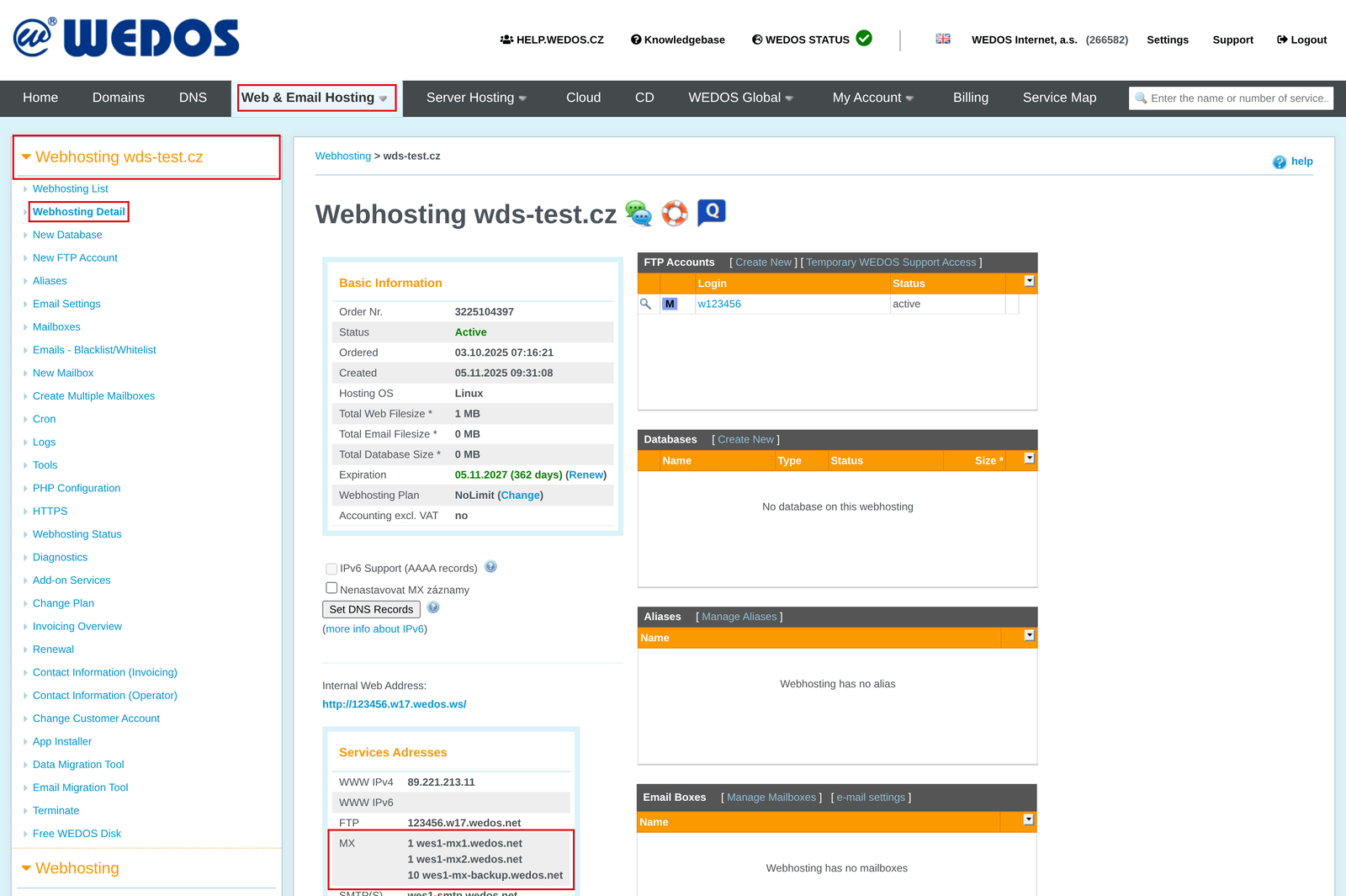
The mail server addresses for MX records are the same for these services. Including the recommended priorities, they are:
1 wes1-mx1.wedos.net
1 wes1-mx2.wedos.net
10 wes1-mx-backup.wedos.net
You can also find these addresses in the Customer Administration ⧉ in the service detail, in the table Service Addresses.
Mailhosting
The mail server addresses for MX records of the Mailhosting service differ from the webhostingones. If you use the email of the Webhosting or WebSite service, do not use these records. Including the recommended priorities, they are:
10 mx1.wedos.email
10 mx1.wedos.global
10 mx1.wedos.com
10 mx1.wedos.mx
20 mx1.wedos.online
You can also find these addresses in the Customer Administration ⧉ in the service detail, in the table Service Addresses.
Your Own Mail Server
If you use your own mail server to receive mail, you need to enter its domain address, because MX records do not support IP addresses. First create a suitable (sub)domain with the server’s IP address using an A or AAAA record Then enter this (sub)domain as the address of the MX record (see the example).
Services Outside WEDOS
If the service whose MX record address you want to find is not with WEDOS, look up the help for that service or contact its provider’s support.
Entering MX Records
For a general guide to setting up DNS records in the Customer Administration, see the article DNS – Domain Records.
If the domain uses third-party DNS servers, neither automatic nor manual changes to WEDOS records will affect its behavior.
When entering MX records, follow these basic rules:
- Leave the Name field emptyif you do not want to receive emails on a subdomain (for example: info@sub.domain.tld).
- In the Data field, always enter one number and one address (for example: 1 wes1-mx1.wedos.net).
A general MX record looks like this:
Name                      TTL    Type  Data
(empty, or subdomain)     300    MX    (priority) (MX mail server address)
The number before the address is the so-called priority. The higher the number you enter, the more the system treats the server as a backup.
MX Records of VEDOS Services
Correctly entered VEDOS MX records for Webhosting, WMS and WebSite look like this:
Name      TTL    Type  Data
          300    MX   1 wes1-mx1.wedos.net
          300    MX   1 wes1-mx2.wedos.net
          300    MX   10 wes1-mx-backup.wedos.net
And for the Mailhosting service:
Name      TTL    Type  Data
          300    MX   10 mx1.wedos.email
          300    MX   10 mx1.wedos.global
          300    MX   10 mx1.wedos.com
          300    MX   10 mx1.wedos.mx
          300    MX   20 mx1.wedos.online
Automatic Setup of MX Records
Under certain circumstances you can have MX records set up automatically. Our system sets DNS records on WEDOS DNS servers.
You can request automatic setup of DNS records:
- By ticking the DNS records setup option when creating and renaming Webhosting, the WebSite service, or Mailhosting or when setting an alias.
- By pointing the domain to the service according to the guide Domains – Pointing to Services.
Examples of MX Records
Example: Correctly entered MX records for the VEDOS Webhosting or WebSite services:

Example: Correctly entered MX records for the VEDOS Mailhosting service:

Example: MX record for your own mail server at IP address 46.28.108.1:

Common Problems
Common problems when entering MX records include:
Cannot Save an MX Record
Problem: When saving an MX record, the error message “Invalid MX record value” appears.
Cause: MX records must be entered in the format number + space + domain address of the MX server, e.g. 1 mx.domain.tld. The number is the priority of the record. An MX record cannot contain IP addresses or several mail servers at once.
Solution: Edit the record data so that it matches the pattern in the error message. Enter each mail server as a separate record; do not put them one under another in a single field.
Mail Is Not Arriving
Problem: Mail does not arrive after creating or editing an MX record.
Cause: The error may be in the record itself, but also in many other places.
Solution: Check that the domain really uses WEDOS DNS servers and that the MX records have had enough time to propagate (typically 1 hour). If you are sending emails to the main domain, make sure the Name field is empty.
A VEDOS service with email does not set the domain’s MX records by itself unless you tick the automatic DNS setup. If the records are missing for the domain, enter them according to the chapter MX Records of VEDOS Services, or point the domain according to the guide Domains – Pointing to Services.
If the records are correct, check that you have an Active Webhosting, a created mailbox and enough space.
Mail Stopped Arriving After a DNS Edit
Problem: After editing DNS records, for example to introduce a mailing service, emails stopped arriving or being sent.
Cause: When editing DNS, a record important for mail may have been deleted or changed, most often the MX or SPF.
Solution: Compare the domain’s records with the chapter MX Records of VEDOS Services and check the SPF record. Create the deleted records again.
Frequently Asked Questions
My webhosting provider did not give me any MX records. What should I do?
Find out whether the provider offers an email service at all. If not, look for an email service provider that meets your requirements.
My email is with a provider other than VEDOS. Which MX records should I enter for a domain at VEDOS?
Enter the MX records of your mail provider, not the VEDOS records. You can find their addresses in the provider’s help or get them from its customer support. Use the VEDOS records from the chapter Finding the Addresses of MX Mail Servers only for services at VEDOS.
The domain uses DNS servers of another provider, for example an e-shop. Where do I set the MX records?
With the provider whose DNS servers the domain uses. Changes to DNS records in the VEDOS Customer Administration do not affect the behavior of a domain with third-party DNS servers do not take effect.
How long after entering an MX record does mail start to be delivered?
Typically within 1 hour. If mail still does not arrive after that, follow the problem Mail Is Not Arriving.
Do I have to order Mailhosting additionally for email on a domain with VEDOS Webhosting?
No. Email services are part of Webhosting; you create mailboxes according to the guide Email – Mailboxes. For Webhosting, use the MX records for Webhosting.
If I have VEDOS Webhosting, can I use another provider of email services?
Yes, just enter that provider’s MX records correctly.
Which records should I use if I have both Webhosting and Mailhosting on a domain?
You cannot have both Webhosting and Mailhosting on one domain. If you have Webhosting, mail services are part of it and you use the MX records for Webhosting.
If you have one of these services on a subdomain, set the corresponding records for that subdomain.
Can I keep WEDOS MX servers as a backup in case my provider has an outage?
We generally do not recommend combining MX records of different providers. Instead, choose a provider with a sufficient number of backup mail servers, and enter all of their addresses in DNS records according to the provider’s guide.
Are these addresses universal for all WEDOS mail servers?
These addresses work for MX DNS records. The mail servers for SMTP, POP and IMAP are different, and addresses containing mx will not work.