
For the Add-on Service to work correctly, configure the domain to use DNS servers (NSSET) WEDOS.
This guide covers activating WEDOS Protection as a domain Add-on Service. Alternatively, add the domain directly in the WEDOS Global interface following the guide Protection – Adding a Domain ⧉, or through the WordPress plugin ⧉.
For general instructions on activating and deactivating Add-on Services, see the article Services – Add-on Services.
In this article, you will learn:
Activating WEDOS Protection on a domain
Before activating the WEDOS Global Add-on Service, make sure the domain uses our DNS servers. For instructions, see the article Domains – DNS servers (NSSET).
You can activate WEDOS Global as a domain Add-on Service when ordering or later in Customer Administration. For detailed Add-on Service activation instructions, see the article Services – Add-on Services.
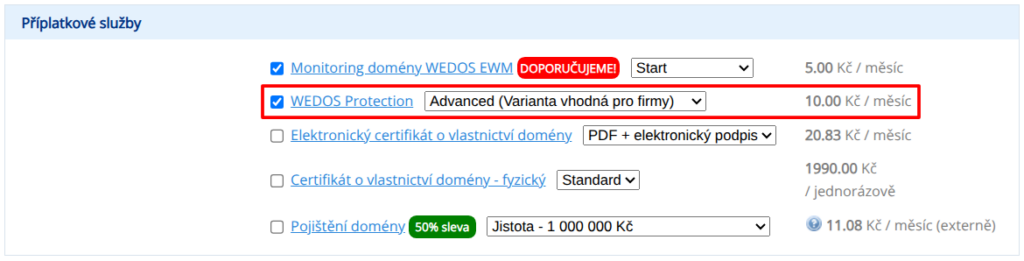
When activated this way, the system automatically makes these changes:
- changes A and AAAA DNS records for the main domain and subdomains covered by the record *);
- applies basic Global system settings for the selected plan.
The settings are typically applied within 30 minutes of Add-on Service activation or detection of a switch to our DNS servers.
Once the domain is set up, or immediately after activating the Add-on Service in Customer Administration, the system adds the selected domain to WEDOS Global administration ⧉.
In the domain details, make sure the DNS settings are OK. If not, point the domain to WEDOS Protection in Customer Administration, or configure the correct DNS records manually.

Common issues
Common WEDOS Protection Add-on Service activation issues include:
The domain is missing from administration
Problem: WEDOS Global administration ⧉ does not display the domain.
Cause: A VEDOS administrator activated the Add-on Service.
Solution: In this case, we recommend contacting support ⧉ and requesting that the WEDOS Protection service be moved to your customer account. Provide the domain name.
Other methods exist, but are more technically demanding and error-prone.
Automatic domain pointing to Protection failed
Problem: After the add-on service is activated, the domain’s DNS records still point to the hosting instead of WEDOS Global.
Solution: If your domain is registered with us, point it to WEDOS Protection following this guide. For more detailed information and manual WEDOS Global DNS configuration instructions, see the article Protection – DNS and Destination IP Addresses ⧉.
Frequently asked questions
Can I activate the service trial this way?
Not in full. Add-on Services can be canceled and refunded only within 7 days of ordering. To use the full trial version, activate it following the guide Protection – Subscription ⧉.