
This article covers service renewal settings. To configure other behavior before expiration, follow the guide Administration – Service Behavior Before Expiration. Detailed information about how service expiration works can be found in the guide Services – Expiration Process.
In this article, you will learn:
- How service renewal works
- How to renew a service manually
- How to renew a group of services in bulk
- How to set up automatic service renewal
- Common issues
- Frequently asked questions
Renewing services
Whenever you renew a service, the selected period is added to its current expiration date.
The system adds the requested period when payment is successfully processed. This requires the exact amount (including the fractional amount) and payment reference to be entered if your chosen payment method requires them.
Changing billing details and some Add-on Service settings cancel the original payment request and issue a new one with a new payment reference. If you pay using the reference from the original or any older invoice, the system will not renew the service. Contact us using the form ⧉, providing the service name and the payment reference used.
The basic renewal period is 1 year. Some services allow longer periods or shorter ones with a handling surcharge. The table provides an overview:
| Service | Renewal |
|---|---|
| Webhosting, WebSite, Cloud, CD | 1 year (repeatable up to the service limit) |
| Domains | 1 to 10 years (up to a maximum of 10 years) |
| WMS, VPS, Dedicated Servers, Disk | 1 year or 1 month (with a 10% surcharge) |
For details of the service expiration process, see the article Services – Expiration Process.
Manual service renewal
To renew a service manually, follow this procedure:
- Log in to Customer Administration ⧉.
- In the top menu, select the type of service you want to renew.
- In the overview, select the specific service you want to renew.
- In the left menu, click Renewal.
- Set the required parameters and confirm with the button order renewal.
Renew service:
Some services offer specific renewal settings:
Domains
You can prepay a domain for up to 10 years. To renew a domain, it must expire in 9 years or less.
Discount coupons cannot be used for domain renewals.

You can also set a recurring domain billing period of 1 to 9 years. This setting is on the same page as domain renewal.

WMS, Servers and Disk
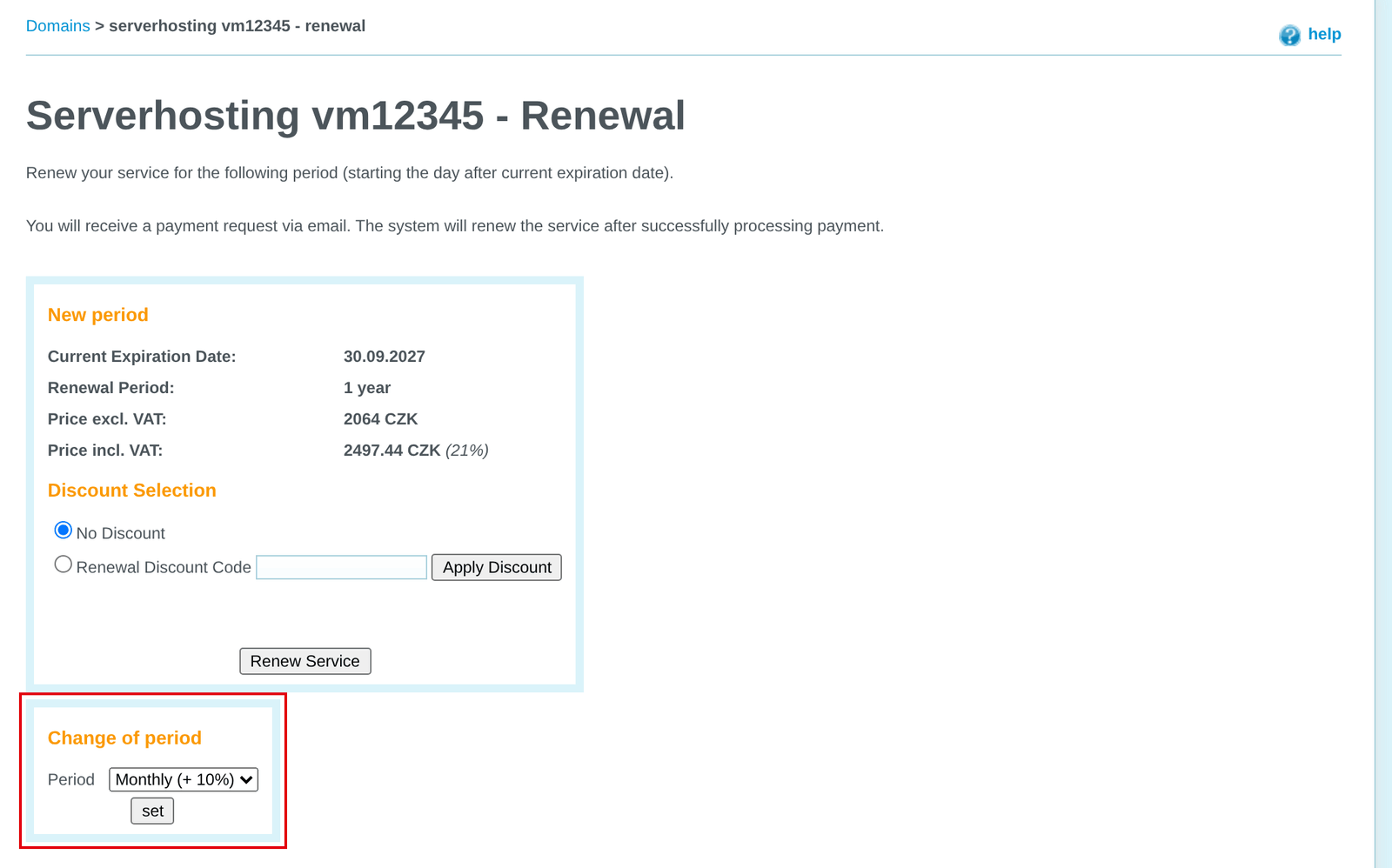
For WMS, VPS, dedicated servers and WEDOS Disk, you can switch between annual and monthly billing (with a 10% surcharge). The new period starts from the current expiration date.
Bulk service renewal
Bulk service renewal requires an active Credit Account with sufficient credit. Service prices paid from the Credit Account exclude VAT.
You can renew services of the same type in bulk. Follow these steps:
- Log in to Customer Administration ⧉.
- In the top menu, select the type of service you want to renew.
- In the overview, select the services you want to renew.
- At the bottom of the overview, select Renewal.
- Click the button apply.

On the next page, enter the renewal details and click the button Continue. Then check the order details and confirm with the button Finish.
Automatic service renewal
Automatic service renewal requires an active Credit Account with sufficient credit. Service prices paid from the Credit Account exclude VAT.
Automatically renewed services do not generate payment requests. If automatic renewal does not occur for any reason, renew the service manually.
You can configure automatic renewal for either all services in selected categories (domains, Webhosting services, etc.), or selected services placed in folders.
Global renewal settings
To automatically renew all services in selected categories, follow these steps:
- Log in to Customer Administration ⧉.
- In the top menu, select My account Customer.
- In the left menu, select Service expiration settings.
- For the selected service categories, select Automatic renewal.
- Click the button Change settings.
Settings using folders
These settings are covered in detail in the guide Administration – Service Behavior Before Expiration.
Common issues
Common service renewal issues include:
- The service is not displayed in Customer Administration
- A discount coupon cannot be entered when renewing a domain
- A service renewal discount coupon does not work
- Low Credit Account balance
- An automatically renewed service expired
- The service renewal payment was returned to the bank account
The service is not displayed in administration
Problem: The service to be renewed is not displayed in Customer Administration.
Cause: The service is registered with another provider, held by another customer or deleted.
Solution: Check whether the service is working. If it is, verify that it is really with us and that you are logged in to the correct customer account. If you cannot verify this, ask for help from customer support ⧉. Provide the service type and name. Support may give you a hint about the service administrator’s name or company, or the login email. The extent of the hint is entirely at support’s discretion and cannot be demanded.
If the service is not working, it was most likely deleted after expiration. For more information about service expiration, see the article Services – Expiration Process.
Domain discount coupon cannot be entered
Problem: The domain renewal order has no field for entering a discount coupon.
Cause: We already offer domains at practically purchase prices, so we do not offer additional discounts.
Solution: Read your coupon’s terms carefully and apply it to renewal of an eligible service.
Renewal discount coupon not working
Problem: The service renewal discount coupon does not work.
Cause: The coupon has expired, reached its maximum number of uses, or is valid only for setting up new services.
Solution: Carefully review your coupon’s terms and expiration date. If you believe it should work for renewing your service, use the form to send the coupon code, the service name where you are applying it, and the text or screenshot ⧉ of the error message.
Low account credit balance
Problem: When attempting bulk renewal, the following message appears: The Credit Account balance is too low (X CZK). The order price is Y CZK.
Solution: Top up the required amount in the Credit Account.
Expired automatically renewed service
Problem: An automatically renewed service was not renewed due to insufficient credit and expired.
Cause: If the Credit Account balance is too low and a service is not renewed, the system does not issue an invoice; it keeps trying to renew from the account. If renewal fails, the service expires.
Solution: Renew the service manually. Check and, if necessary, change Credit Account billing details so that you receive the failed renewal notification correctly next time.
To keep track of service expiration and other website and email outages, use the domain add-on WEDOS EWM ⧉, or monitoring WEDOS OnLine ⧉.
Renewal payment returned
Problem: The service renewal payment was returned to the bank account.
Cause: Once the system deletes an expired service, it refunds payments with the corresponding variable symbol. For payments that the system could not match automatically and that do not correspond to any earlier payment we have on record, the billing department will usually contact you.
Solution: Check the service’s billing email to see whether the billing department contacted you about an unidentified payment. We typically return payments received more than 30 days after expiration (with exceptions for some services), because the associated services have been deleted.
Frequently asked questions
Why do you send a service renewal payment request a month before the due date?
By default, we send emails in advance to reduce the risk of service interruption due to email or payment complications. To change notification frequency, follow the guide Administration – Service Behavior Before Expiration.
How do I renew hosting for more than 1 year?
Some hosting services can be renewed for more than 1 year, but not in one step. After paying for the first renewal, request another renewal. The system either issues a new request for another period or rejects it once the maximum renewal period for the service is reached.
Can I pay for a manually renewed service using credit?
Yes, follow the this guide.
If I pay for a service early, do I lose part of the previous period?
No. Whenever you pay, the service is renewed from its original expiration date. The same applies to late payment: if you pay 2 days late, the system renews from the expiration date, rather than the payment receipt or service reactivation date.