
This guide covers switching between Webhosting and Website SODEW. WebSite 1.0 has been discontinued and switching to it is no longer supported.
For instructions on switching between other service types, see the article Services – Changing the Hosting Type.
In this guide, you will learn:
- When to Use This Guide
- Comparing Webhosting and Website SODEW
- How to switch from Webhosting to Website SODEW
- How to switch from WebSite 1.0 to Webhosting
- How to transfer email between Webhosting and WebSite
- Common issues
- Frequently asked questions
When to Use This Guide
- When ordering WebSite, the system reports that the domain name is already used with Webhosting. See The Domain Name Is Already Used with Webhosting.
- You have Webhosting and want to use WebSite SODEW instead. Follow the chapter Switching from Webhosting to Website SODEW.
- WebSite doesn’t suit you and you want classic Webhosting, for example for WordPress. See Switching from WebSite 1.0 to Webhosting.
- You bought Webhosting, but your website is built in the WebSite editor. The answer is in the Frequently Asked Questions.
- The system reports that the domain is in another customer account. See The domain is in another customer account.
- After the switch, the old website or an error is displayed. See Website not working or outdated.
Comparing Webhosting and Website
Services Webhosting ⧉ and WebSite ⧉ are both primarily used to publish a website on the internet and, where applicable, run email.
- Webhostingis used to run your own website or web application, or a content management system (WordPress, Joomla, PrestaShop and others). You can run practically any application that uses HTML, CSS, JavaScript and PHP. All Webhosting variants are paid and include email.
- WebSite SODEW is webhosting with an AI website editor based on the WordPress content management system, through which you create all content. The service does not include email, so to run it you will need Mailhosting ⧉.
Switching from Webhosting to Website SODEW
To replace an existing Webhosting website with one created using Website SODEW, simply point the domain correctly in DNS. For more information, see the SODEW documentation ⧉.
Terminating Webhosting
If you have no other use for Webhosting, terminate it.
You can request a refund for Webhosting set up no more than 7 days before submitting termination. Older Webhosting can only be allowed to run until its end date.
Switching from WebSite 1.0 to Webhosting
To replace an existing WebSite service with a website using Webhosting, you need to:
If you no longer want to use WebSite, after completing the switch, terminate it.
Releasing the WebSite 1.0 domain name
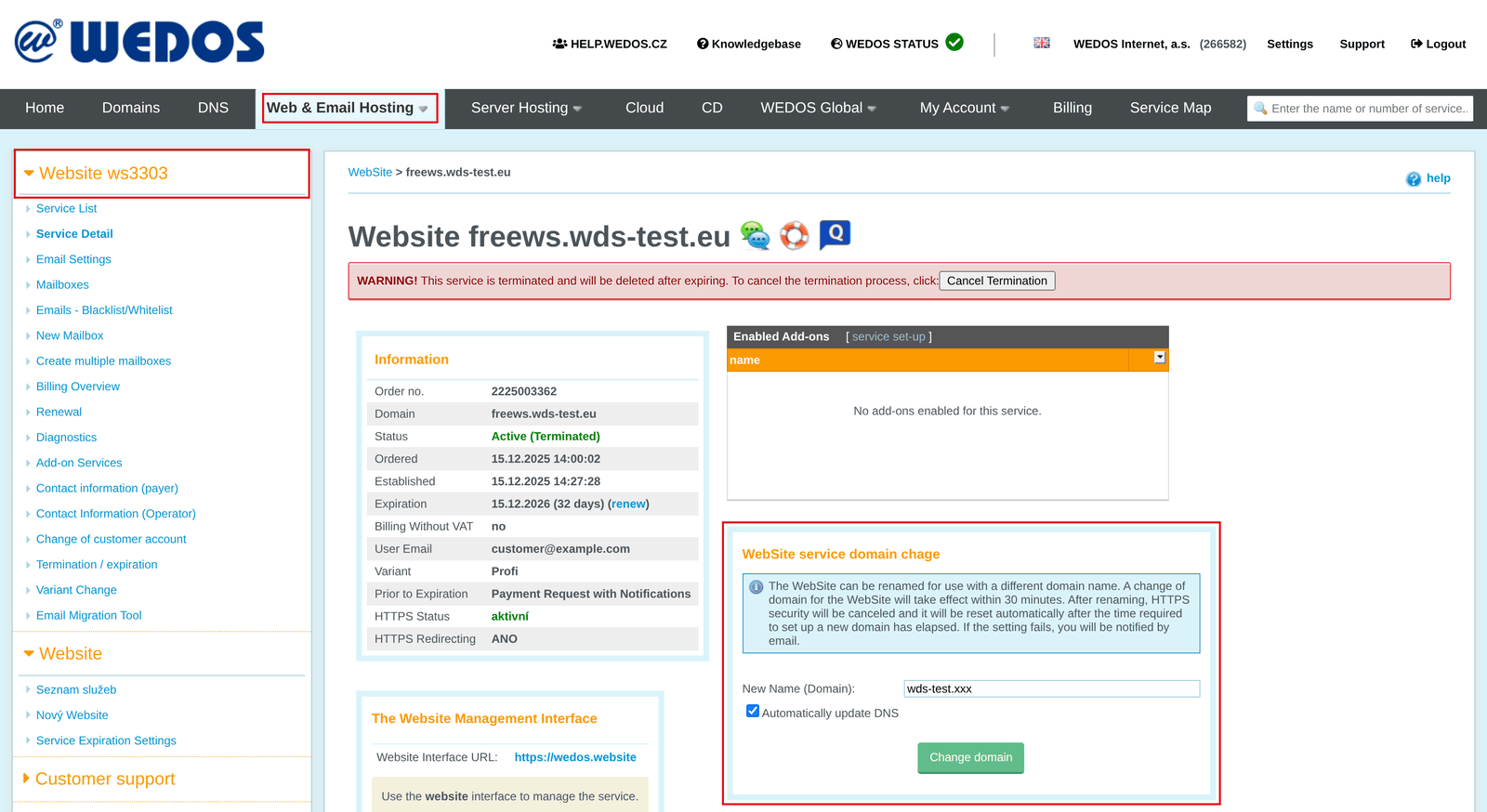
You release a WebSite service’s domain name by renaming it.
If you want to continue using WebSite, you can rename it directly to a new domain name following the guide WebSite – Changing the Domain. If you no longer want to use WebSite, rename it using an unused subdomain, such as staryweb.domena.tld.
Once the name is released, the old WebSite website stops working. The block editor remains accessible.
Setting up Webhosting
Set up Webhosting by completing the order form ⧉. The system creates the service within 1 hour of receiving payment.
After setting up Webhosting, we recommend activating HTTPS following this guide.
Terminating WebSite
If you have no other use for WebSite, terminate it.
You can request a refund for WebSite set up no more than 7 days before submitting termination. Older WebSite can only be allowed to run until its end date, but as part of termination you can request transfer of the remaining funds to the new Webhosting service you created. Enter the request in the field Reason for termination, including the name of the service to receive the funds.
Transferring email between services
If the original service has mailboxes, after switching:
- from WebSite 1.0 to Webhosting will not be accessible under the original name. If the new domain or subdomain does not exist, no new mail will arrive, but existing email remains in the mailboxes until they or the entire service are deleted.
- from Webhosting to Website SODEW, email remains on Webhosting. If you want only email with VEDOS, switch to Mailhosting.
To access email on the original service, you can use an email client or WebMail ⧉. Change the mailbox login to use the original service’s new name, for example info@stary.domena.tld.
The system deletes terminated Webhosting or WebSite services 7 days after expiration.
To keep email running, create identical mailboxes on the new service following the guide Email – Mailboxes. Then migrate older email into the new mailboxes following the guide Email – Automatic Migration.
For detailed instructions on switching between Webhosting and Mailhosting, see the article Services – Switching Between Webhosting and Mailhosting.
Common issues
Common errors when switching between Webhosting and WebSite include:
- The Domain Name Is Already Used with Webhosting
- An existing service order with the same name
- The domain is in another customer account
- An error or the old website is displayed
The Domain Name Is Already Used with Webhosting
Problem: When ordering WebSite, the following message is displayed: The domain name is already used by another service (Webhosting).
Cause: Webhosting and WebSite are mutually exclusive; both cannot exist for a single domain name.
Solution: Switch from one service to the other by following the chapter Switching from Webhosting to Website SODEW, or Switching from WebSite 1.0 to Webhosting.
An existing order with the same name
Problem: The following error message appears: An order (service) already exists for this domain in the system.

Cause: The system has an existing service or active service order with that domain name (alias).
Solution: Make sure renaming the original service or removing its alias completed successfully. If it still has its original name, try renaming it again using another browser.
If an unpaid order prevents renaming or creating a new service, ask support ⧉ to cancel it.
The domain is in another customer account
Problem: The following error appears: The domain is held in another customer account.

Cause: If you rename a service to an existing domain registered with WEDOS, or create a service for that domain, the service and domain must be in the same customer account, at least temporarily.
Solution: Move the domain to your own account, at least temporarily, using the authorization password or service transfer using login and ID.
Website not working or outdated
Problem: The old website or an error message is displayed.
Cause: Website content is often cached in the browser. It may therefore display the old website’s data even though the domain already points to different hosting.
Webhosting and WebSite use different A and AAAA DNS records. Their MX records are identical. When renaming or creating services, you can let the system set DNS records automatically. If you decline automatic setup by clearing the relevant checkbox, you must point the domain to the service later.
Solution: If the original website is displayed, first try loading it without the browser cache using the keyboard shortcut Ctrl+Shift+R.
If an error appears, point the domain to the new service following the guide Domains – Pointing to Services, or manually following the guide DNS – Domain Records. Automatic DNS configuration works only if the domain’s DNS records are with us. Otherwise, configure the records manually following your provider’s instructions. Service addresses are listed in the table of the same name in the Service details.
Frequently asked questions
I bought a domain with Webhosting and now cannot activate WebSite. Why?
Webhosting and WebSite are different services. WebSite includes its own webhosting, although it cannot be managed through Customer Administration. To use WebSite instead of Webhosting, switch services following this guide.
What if I want both WebSite and a content management system on one domain?
You can run a content management system or WebSite on a subdomain, but you must create a separate service for it.
I bought Webhosting, but my website is built in the WebSite editor. Do I have to transfer it to Webhosting?
No. You don’t need Webhosting to publish a website from the editor; just publish the website in WebSite. Switch from Webhosting back to WebSite by following the chapter Switching from Webhosting to Website SODEW and Webhosting terminate it.