
This article is simplified for beginners. For complete information on how DNS works, see the DNS category.
What do you want to do with DNS?
Redirect to the VEDOS service
This guide assumes that you have a domain and an existing VEDOS hosting service, and that the domain uses WEDOS DNS (the default setting for domains registered with VEDOS).
Log in to the customer administration and visit the link directing the domain ⧉.
Select the domain you want to point to the hosting from the list.

Select the hosting service you want to point the domain to (Web Hosting, Hosting WP, Email Hosting, etc.).
Select whether you want to disable changes to MX record settings (email).
Click Setup.
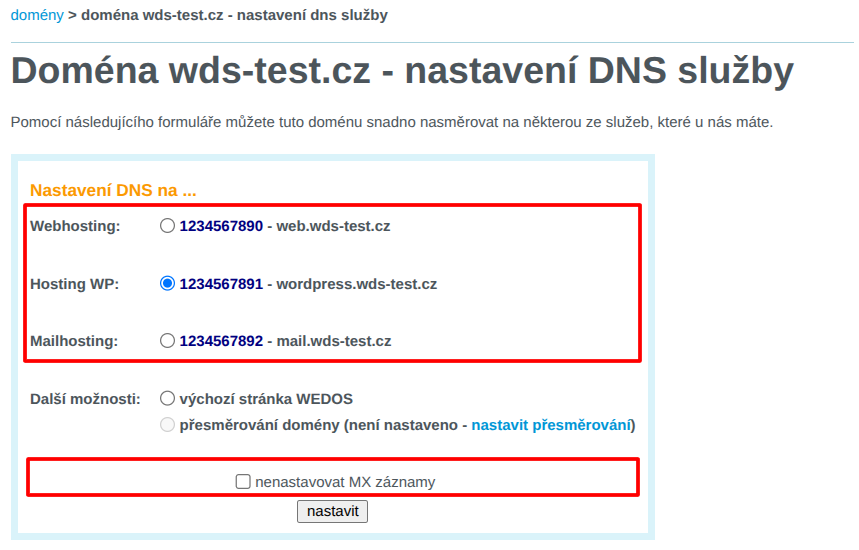
Done! 🎉
Wait a few minutes for the changes to sink in.
If the changes to the site do not take effect, try refreshing the page without the browser cache using the Ctrl+Shift+R keyboard shortcut.
Records of another provider
The instructions assume that the domain uses WEDOS DNS (the default setting for a domain registered with WEDOS).
Log in to the customer administration and visit the edit domain records link ⧉.
From the list, select the domain on which you want to set the records.
In the DNS records table, check all records with the same name and type that the provider wants you to set up.
If your service provider requires you to set up A records, and your domain has both A and AAAA records, delete both types.
Click the Delete Records button.

For each record from a different provider, click New Record, complete the form, and click Save Record.
Follow these rules:
- Enter the record name without the domain name itself (field Name may be empty.
- Sign
@delete from the record name. - From a subdomain name of the form e.g.
www.domena.tlddelete the domain name, leave only the subdomain (e.g.www).
- Sign
- Do not fill in the TTL field.
- Enter the type and dates exactly as instructed by the provider.
- The data of MX records should be in the form
X domena.tldwhereXis the number that the provider specifies as a priority, anddomena.tldis the mailserver address.
- The data of MX records should be in the form

Done! 🎉
Changes will usually take effect within 30 minutes.