
In this guide you will learn:
- What plans are available for the Hosting WP service?
- How to change your plan
- How to change the billing period
- Frequently Asked Questions
Rate Comparison
The Hosting WP service offers three plans that cover a wide range of needs.
All plans share several common features:
- The service includes one WordPress content management system on a single domain or subdomain. It does not support aliases or additional subdomains.
- The web servers use Litespeed and Redis caching to maximize application performance.
- WEDOS Global Protection provides protection against DDoS, brute force, and other attacks.
You can find the main differences between the various plans in the table:
| Parameter | LowCost WP | NoLimit WP | Business WP |
|---|---|---|---|
| Web hosting | 10 GB | Unlimited | Unlimited |
| Database space | 1 GB | 2 GB | 5 GB |
| Email storage | - | 10 GB | 1 TB |
| Billing period | One-year-only | One-year-only | Annual or monthly |
Change of tariff
With the Hosting WP service, you can upgrade or downgrade your plan. When changing your plan, please keep the following rules in mind:
- If the rate is increased, the system will issue a supplementary invoice for an amount equal to the price of the service for the entire remaining period. If any of the supplementary services are canceled when the rate is increased, the system will reduce the price accordingly.
- If you downgrade your plan, we will not refund any money paid for the upgrade, not even partially. The downgrade option is available only if your email service usage meets the criteria for the target plan.
Preparing for a rate change
You don't need to do anything to upgrade your plan.
Before switching to a lower rate plan, make sure that with the new rate plan:
- With NoLimit WP, your email inboxes cannot exceed 5 GB. If you need to switch to a plan with a larger email storage capacity, please contact customer support using the ⧉ form. Please include the service name and your desired email storage capacity.
- With LowCost WP, you do not have any active email accounts for this service. If you need to delete any accounts, follow the instructions in the " Emails – Manage Accounts" section.
Making a rate change
Follow these steps to change your Hosting WP plan:
- Log in to the customer administration ⧉.
- In the navigation bar, select Hosting Services > > Hosting WP.
- Select the service from the list for which you want to change the plan.
- In the left-hand menu, select " Change Plan."
- For the selected plan, choose a billing cycle and click the SELECT button.
- Confirm the change by clicking the SET RATE button.
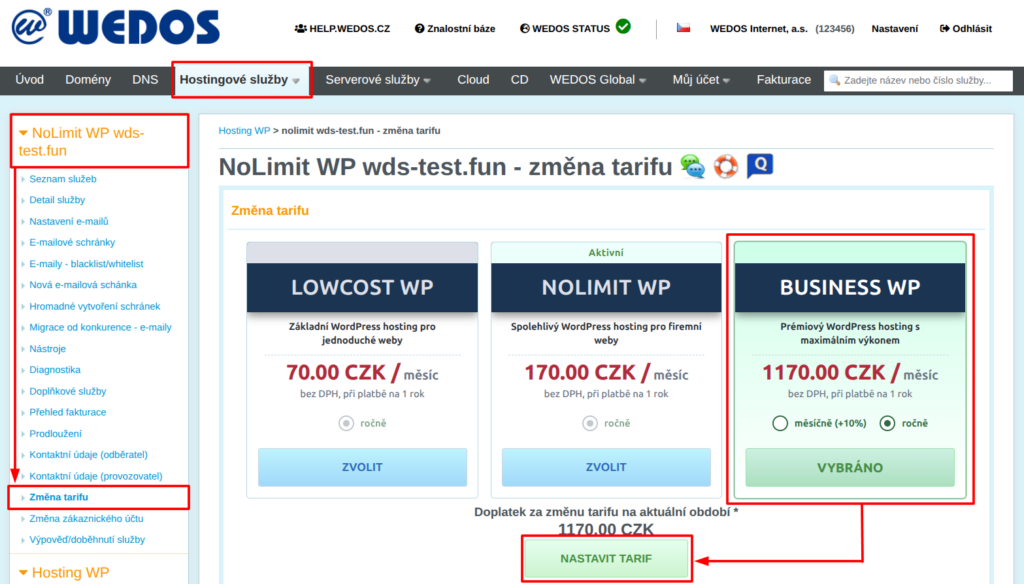
If the additional charge for the change is not zero, the system will immediately generate and send an additional invoice.
Change in billing period
To change the billing period, follow the same steps as when changing your plan, but in the box for your selected plan, check the desired billing period.
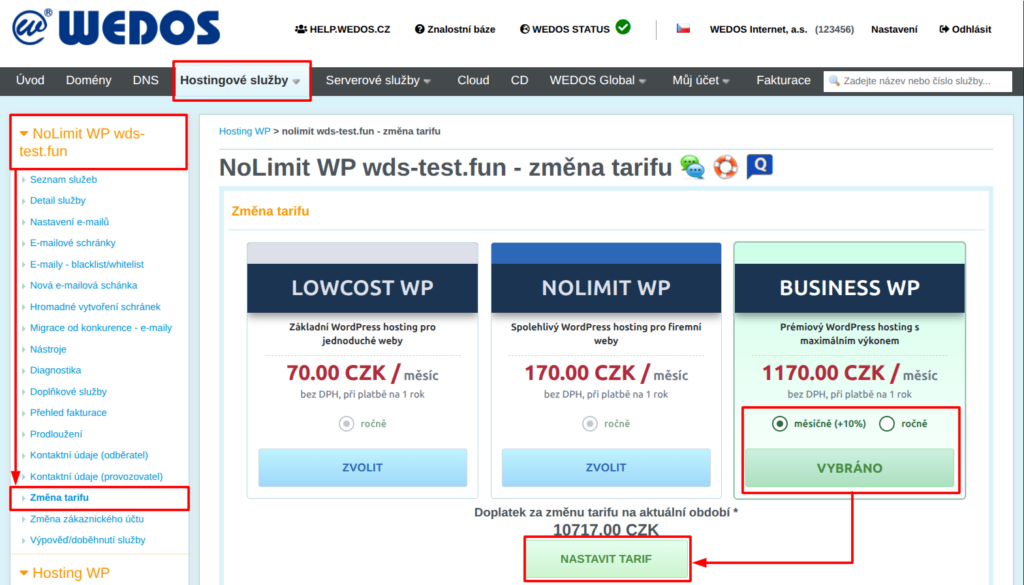
The change to the billing period will take effect after the current service expiration date.
Frequently Asked Questions
I'm upgrading to the Business plan with monthly billing. Why is the amount on the additional invoice so high?
The additional invoice charges for the service based on the current billing period. For monthly billing cycles, the system will not issue invoices until the following billing period.