
In this guide you will learn:
- How the WP Hosting trial works
- How to Set Up a Trial Version of WP Hosting for a Domain
- How to upgrade from the trial version to the full version
- Common problems
- Frequently Asked Questions
Trial version of the Hosting WP service
The trial version of the Hosting WP service has the following specifications:
- It is free with the purchase of a new domain. We do not offer a trial version of the service for domain renewals.
- It lasts 30 days. You can upgrade from the trial version to the full version before the trial period ends.
- The plan is NoLimit WP. This means you can test both WordPress and email.
Setting up a trial version
Setting up a trial version of Hosting WP is easier than ever. Simply leave the default option “WordPress NoLimit WP 30-Day Trial (website + email, included with domain order)” selected in your domain order.
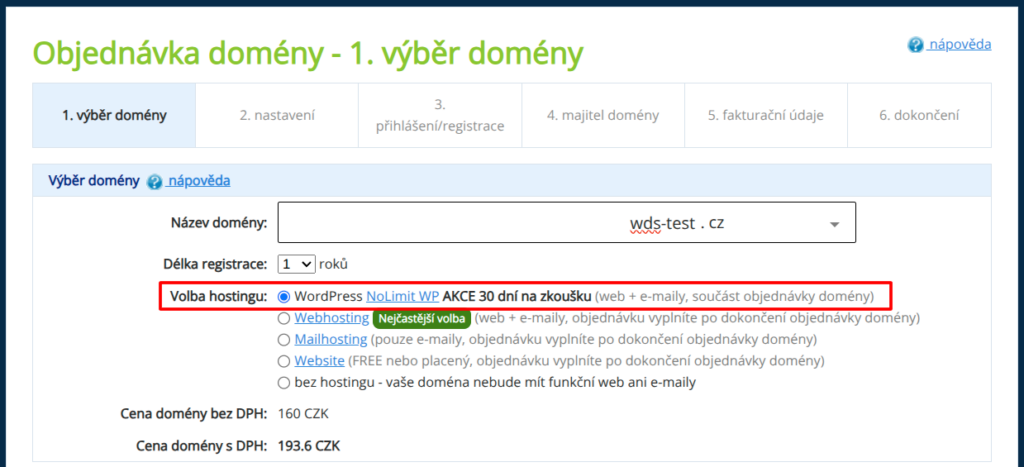
The service will be activated once the domain order has been paid for, using the following information:
- Billing information: same as the domain's billing information.
- Service provider: same as the domain owner.
You can change this information when you upgrade from the trial version to the full version, or at any time later in the customer dashboard.
Upgrade from the trial version to the full version
If you want to keep your Hosting WP service, be sure to switch from the trial version to the regular version in time. Follow these steps:
- Log in to the customer administration ⧉.
- In the navigation bar, select Hosting Services > > Hosting WP.
- Select the service you want to change to a standard service from the list.
- In the notification box, click the " Upgrade TRIAL" button to upgrade to the full version.
- Review the billing information and service provider details in the form, and make any necessary changes. Check the boxes to agree to the terms and conditions, then click the " Order Service" button.
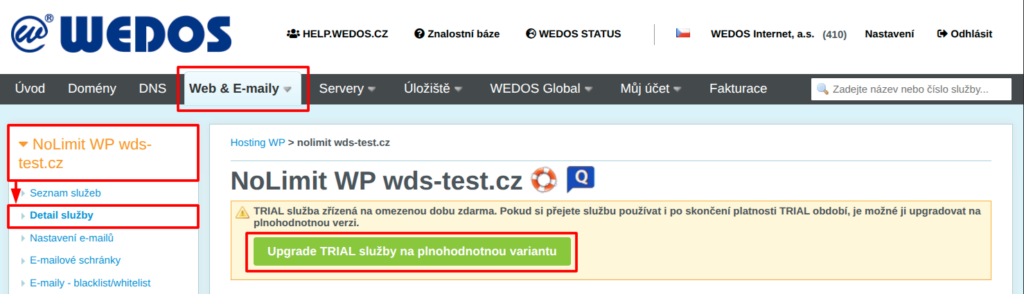
Once you submit your order, the system will immediately generate a payment request and send it to your updated billing email address. You can also find a copy in the billing section of the ⧉ customer portal.
Common problems
Common issues with the trial version of the Hosting WP service include:
Slow service setup
Problem: The service is taking a long time to set up after the domain order has been paid for.
Cause: The system is waiting for the DNS settings to propagate.
Solution: Please wait several tens of minutes. Unfortunately, the propagation of DNS records for a newly created domain is a time-consuming process over which we have no control. Once the service has been successfully set up, the system will send you an email notification.
Frequently Asked Questions
What is the difference between the WordPress trial version and the full version?
There is no difference in WordPress’s functionality or performance. The only limitation of the trial version is the time limit—that is, the 30 days.
I have a discount coupon for signing up for the service. Can I use it to upgrade from the trial version to the full version?
Yes, when you upgrade from the trial version to the full version, you can apply a discount coupon to the new service.
If I pay to upgrade from the trial version to the full version, will I lose the remaining days of my trial period?
No, by purchasing the full version, you’ll get an extra year of service, starting from the date your trial period expires.