
In this article you will find the procedures for editing invoice documents for unpaid calls for payment and invoices. The system no longer accepts changes to paid purchase orders on issued documents.
Procedures for permanently changing your billing information can be found in the Services - Billing Information instructions.
In this article you will learn:
- How to change the billing details of a payment request once
- How to change the billing details of a supplementary invoice
- How to enter a custom document ID
- Frequently Asked Questions
One-time change of order data
You can only change the buyer of an unpaid order!
If you need to make a change to the details of the issued payment request so that the change does not affect the payment details (variable symbol) and permanent billing details, please follow these steps:
- Log in to the customer administration ⧉.
- Select Billing from the top menu.
- Click on Orders in the left menu.
- Select the unpaid service order whose details you want to change.

- At the bottom of the order, under the Subscriber table, find the Edit Subscriber link and click on it.

In the window that you click on the link to open, set new billing information, uncheck the consents and save your changes.
Edit without access to administration
If you do not have immediate access to the customer administration, you can do the following:
- Open the email asking for payment.
- Click on the link to change your billing information.
- Edit and save the data.
Changes will be reflected on all documents that relate only to this specific call. The permanent billing details of the service in the system will not change.
You can make changes at any time before you pay for your order. The system does not accept them after payment.
Changes to supplementary invoices
For supplementary invoices (when ordering an additional service), you cannot change the billing information directly. The data on the supplementary invoice is always set by the system according to the billing data of the basic service to which the supplementary service is ordered.
If you want to issue a supplementary invoice with different data, first adjust the billing data of the main service (e.g. Web hosting) according to the instructions Services - Billing data, and then contact ⧉. We will reissue the invoice to you.
Internal order number
If you need to add your own document ID to issued documents for your accounting records, follow these steps:
- Open the details of the selected order.
- In the Order Information table, fill in the Internal Order Number field.
- Click the Save Changes button.
- Download the updated documents from the admin panel.
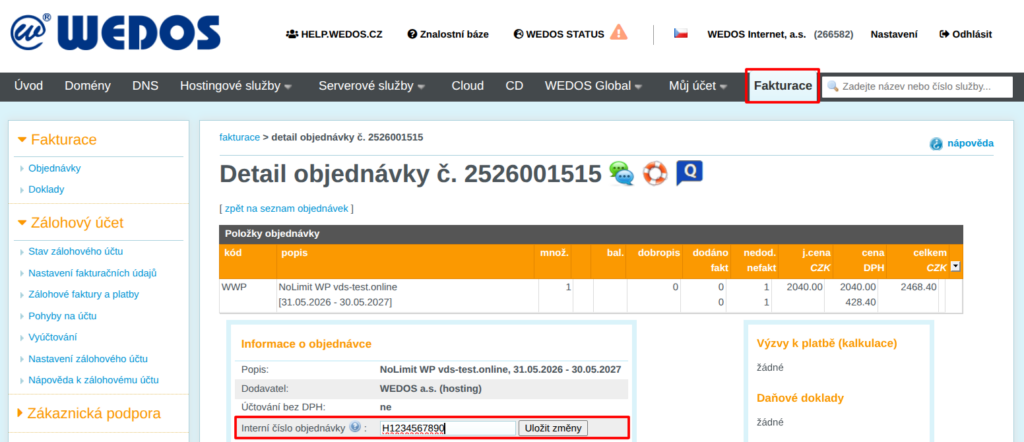
Setting an internal order number does not affect other orders or documents issued before it was added (such as payment requests sent by email).
Frequently Asked Questions
What if I don't see the link to modify the subscriber?
If you don't see the link, it may be a paid order or the system is blocking the change for another reason. Change the billing information according to the Service Instructions - Billing Information.
What if I don't see the order listed?
If the service is functional, it may be held in another customer account or with another provider. Contact the service provider or administrator to arrange for data modification or transfer of the service. If the service is not functional even in someone else's account, it is probably deleted.