
Before resetting WordPress, we strongly recommend that you create your own backup!
In this article you will learn:
- How the WP Hosting Reset Works
- How to reset the service to its default state
- Frequently Asked Questions
Reset Process
Resetting the WP Hosting service will perform the following actions:
- Deleting files and the database. A reset will delete all user content from the pre-installed WordPress installation, which can then only be restored from a backup. A reset does not affect emails.
- A fresh WordPress installation with default settings. After the reset, the same WordPress installation will be available as when the service was first set up. The system will send information about the reset and login details to the service’s current billing email address.
Restore the service to its default state
To restore the WordPress content management system to its original state, follow these steps:
- Log in to the customer administration ⧉.
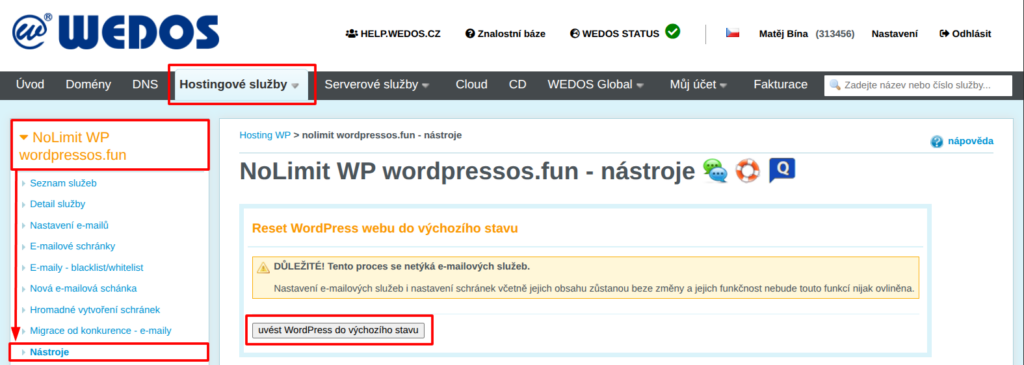
- In the navigation bar, select Hosting Services > > Hosting WP.
- Select the service you want to reset from the list.
- Select Tools from the left menu.
- In the "Reset WordPress Site to Default" section, click the " Reset WordPress to Default" button.
After clicking the button, please wait 1–3 minutes. Once the system has completed the reset, you will be notified by email.
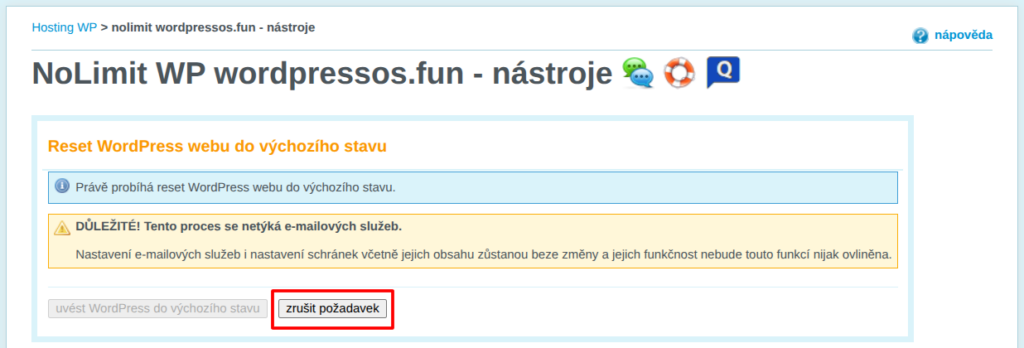
After sending the reset command, you can cancel it by clicking the "Cancel Request" button, which, however, only works for a few dozen seconds after the reset begins. It serves as an emergency brake in case you realize immediately after initiating the reset that you still need to save something on the website.
Frequently Asked Questions
We accidentally reset the wrong website. What should we do?
Cancel the request. If the reset has already taken place, restore the website from a backup—either your own or request a restore from us.
How do I reset my email account?
Back up your emails using an email client, such as Thunderbird. Then delete the existing folders.