
This article is simplified for beginners. For complete information on changing from one type of hosting to another, see Services - Switching between Web Hosting and Mail Hosting and Services - Switching between Web Hosting and WebSite.
What do you want to do with hosting?
Domain Service Exchange
Visit the link to cancel the original service:
Select the service you want to cancel from the list.
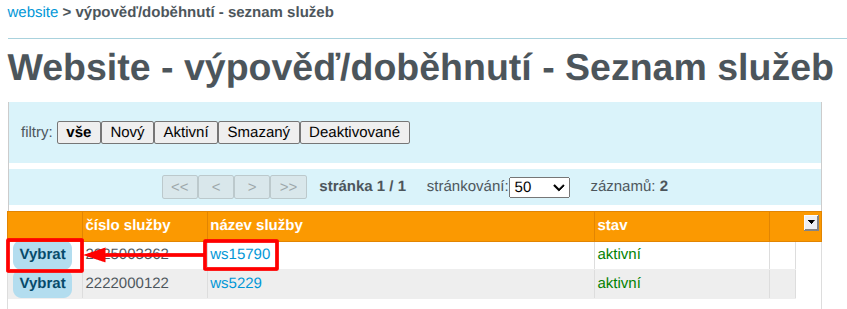
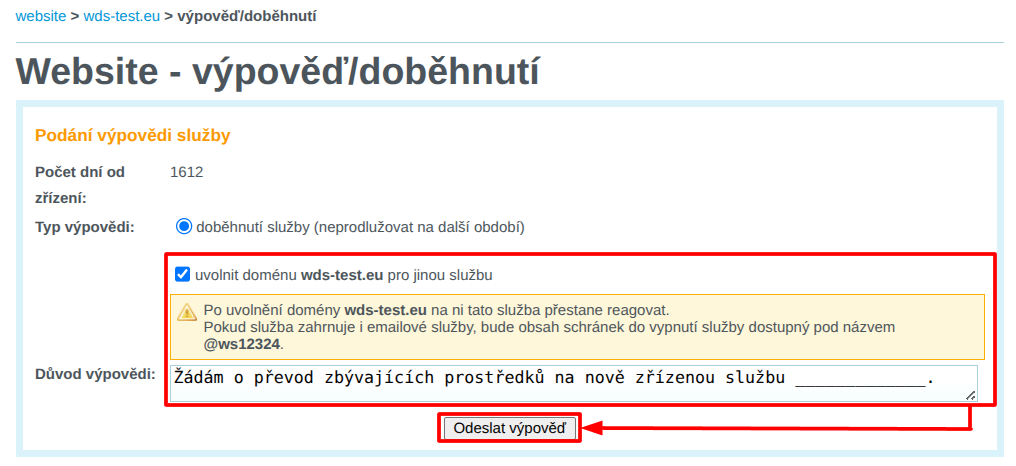
In the termination/expiration interface:
- Check the box to release the domain for another service
- In the "Reason for Cancellation " field, indicate that you wish to transfer the remaining funds to a newly created service. Please provide the domain name of the service you will be creating.
Order a new service on the original domain:
Done! 🎉
You have a new service on the original domain, plus a bonus period for terminating the original service.
Moving emails to a new service
Log in to the customer administration and visit the link to migrate emails to the service:
From the list, select the new service you want to move the emails to.

Fill in the following information in the form:
- IMAP server: Enter
wes1-smtp.wedos.net. If the connection fails, trywes2-smtp.wedos.net. - Migrate new mailboxes: enter the full name pairs of the original mailbox (including the current domain) and password. Separate the name and password with a space, and enter the other pairs on separate lines.
If the original service is renamed to the stary subdomain as described in the previous section, enter the original mailbox with the name of the subdomain, such as info@stary.wds-test.cz.
Once you have filled in your details, click Continue.

Done! 🎉
Wait for the establishment and transfer of the contents of the e-mail boxes. The migration usually takes several tens of minutes to hours, depending on the volume of emails and the load on the migration server.
The new mail will already be delivered to the new mailboxes.