
This article describes service termination. To cancel an entire customer account, follow the guide Administration – Canceling a Customer Account.
To switch Webhosting to a cheaper plan only, follow the guide Services – Changing the Plan or Billing Period. Downgrading WMS, VPS and WebSite plans is currently not possible.
In this article, you will learn:
- Kdy tento návod použijete
- How to cancel a new order
- How to terminate an existing service or let it run until its end date
- How to cancel a service during its trial period
- How to withdraw from a contract due to recurring technical issues
- Frequently asked questions
Kdy tento návod použijete
- Chcete zrušit doménu nebo webhosting a nevíte, na koho se obrátit. Viz Letting a service run until its end date.
- Služba Vám vypršela nebo ji nechcete prodloužit a přišla faktura či upomínka. Viz Frequently asked questions.
- Přecházíte na jinou službu nebo k jinému poskytovateli a chcete starou službu ukončit. Viz Cancellation during the trial period and Frequently asked questions.
- Chcete nižší konfiguraci služby, například VPS. Viz Frequently asked questions.
- Služba Vám nefungovala a chcete odstoupit od smlouvy. Viz Withdrawal due to technical issues.
Canceling a new order
You can currently cancel only a domain order yourself. To cancel another service order, contact customer support using the form ⧉. Provide the service type and name.
You can cancel an order that has not yet been paid. Follow these steps:
- Log in to Customer Administration ⧉.
- In the top menu, select Domains.
- In the domain list, select the service with the status awaiting payment.
- In the details, click the button Cancel order.

Letting a service run until its end date
You can let an existing service run until its end date. Enabling this makes the following changes in the system:
- All active service renewal invoices are canceled. Additional invoices are unaffected.
- You unsubscribe from WEDOS service expiration notification emails. The relevant registry may still notify you about domain expiration.
- For hosting services, the time until complete deletion after expiration is reduced from 30 to 7 days (from 7 to 0 days for dedicated servers).
Setting a domain to run until its end date does not affect its grace period.
To let a service run until its end date, follow these steps:
- Log in to Customer Administration ⧉.
- In the top menu, select the type of service you want to end.
- Select the service to end from the list.
- In the left menu, select Service termination/end of service.
- For hosting services, enter the type and reason for termination.
- Click the button Submit termination or End service.
Services awaiting termination keep their names until they are fully deleted. If you are terminating a service to create a new one with the same name at VEDOS, select the checkbox release domain for another service.
Terminate/end service:
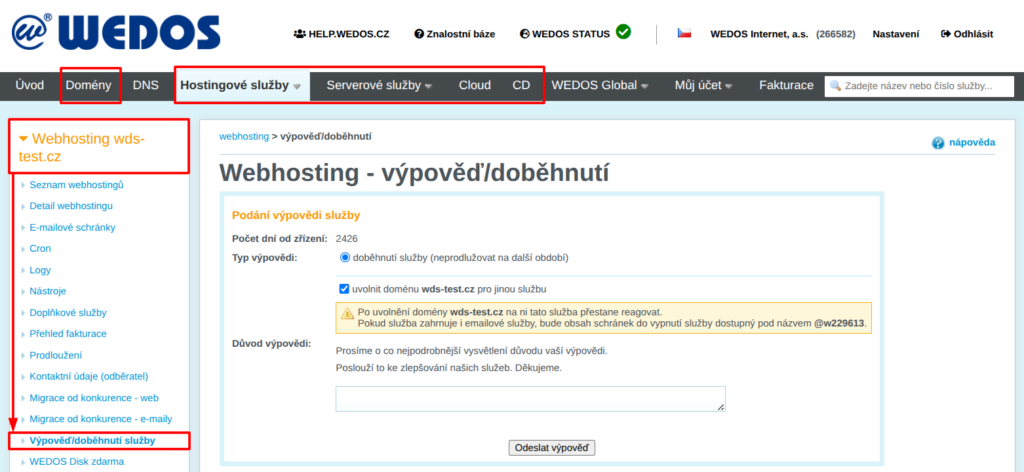
To cancel the pending termination, follow the same steps, but in the final step click the button Cancel pending termination.
Cancellation during the trial period
For all services except domains and dedicated servers we offer a 7-day trial period.
If you terminate a service following the procedure above within 7 days of setup, you can select as the termination type the option cancellation during the 7-day trial period, refund.
After you submit this termination type, a VEDOS employee normally contacts you at the billing email within 1 business day to arrange a full refund.
Withdrawal due to technical issues
For all hosting services, you may withdraw within 180 days of setup due to recurring technical issues on the provider’s side. In the termination form, select the appropriate termination type and in the reason provide the times and nature of the technical issues. Normally within 1 business day, at your billing email a VEDOS employee will contact you to arrange a proportional refund.
Frequently asked questions
How long does a service take to end?
Hosting services awaiting termination are usually deleted 7 days after expiration. Domains follow the grace-period rules specific to their extension and set by the registry.
I want to terminate a service now so I can create a new one with the same name. What should I do?
Before ending it, rename the service following the guide for Webhosting, Mailhosting, or WebSite. If the system does not allow these changes, contact customer support using the form ⧉ with a request to remove the service name.
How can I cancel a service immediately?
For immediate service cancellation, contact support ⧉. Provide the name of the service awaiting termination and request immediate termination.
Immediate domain termination is subject to a fee according to the price list ⧉.
I am terminating a service to create a different type or merge services. The original service still has a fairly long prepaid period. Can I transfer the unused funds to another service?
Yes, enter a request to transfer funds to another hosting service in the termination form. Make sure the receiving service has already been created and provide its type and name or number in the form. The transfer cannot be used for domain renewal.
Stačí službu, o kterou nemám zájem, neprodloužit a nezaplatit fakturu?
Ano, služby se předplácejí, takže Vám neuhrazením nevznikne žádný dluh. Chcete-li navíc přestat dostávat faktury a upozornění na expiraci, nechte službu doběhnout.
Přecházím na jinou hostingovou službu. Dostanu peníze za starou službu zpět?
Ano, vypovězte starou službu po migraci na novou. Do 7 dnů od zřízení služby můžete zvolit vrácení peněz (zrušení ve zkušební době), později požádejte v poli pro odůvodnění výpovědi o převod zbývajících prostředků na novou službu a uveďte její typ a název.
Chci webhosting používat na jiné doméně a původní doménu zrušit. Mám webhosting vypovědět?
Ne, webhosting jen přejmenujte podle návodu pro Webhosting. Původní doménu pak můžete nechat doběhnout, nebo ji stačí neprodloužit.
Přecházím s webem k jinému poskytovateli hostingu. Co mám udělat u Vás?
Při přesunu webu postupujte podle instrukcí nového poskytovatele. Službu u nás poté nechte doběhnout, nebo vypovězte.
Chci VPS s nižší konfigurací, než mám. Lze ji snížit?
Ne, snížení konfigurace VPS systém nepodporuje. Objednejte novou službu s nižší konfigurací a systém na ni přemigrujte sami, podporu k tomu nenabízíme. Původní službu pak vypovězte a požádejte o převod nevyužitého období na novou.