
In this article, you will learn:
- When to use this guide
- What Add-on Services are and how they work
- How to manage Add-on Services:
- How Add-on Service billing works
- Common issues
- Frequently asked questions
When to use this guide
- Monitoring is running on your domain that you did not order, or you are receiving many notification emails. Find out where the monitoring comes from and how to cancel it.
- You are ordering hosting with an extension and want everything on one invoice. You will find the answer in the chapter on ordering and in the frequently asked questions.
- A payment request includes an email capacity increase that you no longer want or cannot remove. The procedure for the deactivation problem is described in.
- You received another payment request for an add-on service that you have already paid for. The solution is in the problem with the repeated payment request.
- The add-on service management says it cannot be set before the service expires. See unavailable management.
Add-on Services
Add-on Services are optional additional settings for various services. They include, for example, increasing mailbox capacity.
You can activate an Add-on Service once as a trial, free for up to 7 days. If you deactivate it within 7 days of activation, the system cancels the additional invoice.
Some Add-on Services may have different free activation rules.
Complete Add-on Service overviews, including links to detailed information, are available on the service product pages or in Customer Administration.
Managing Add-on Services
You can activate or deactivate extensions when ordering a new service, or later in Customer Administration.
Add-on Services in an order
Step 1 of a new service order shows the extensions available when setting up the domain or hosting. Some Add-on Services become available only after setup in Customer Administration.
Recommended Add-on Services are enabled in the order and included in its price. Add-on Services ordered this way do not have a trial period.

To activate or deactivate an Add-on Service in the order, select or clear the corresponding checkbox. Click its link to view the Add-on Service product page.
Add-on Services in Customer Administration
To activate, deactivate or change an Add-on Service in administration, first open its control panel as follows:
- Log in to Customer Administration ⧉.
- In the top menu, select the type of service whose add-ons you want to manage.
- Select the specific service from the list.
- In the left menu, select Add-on Services.
Manage Add-on Services:
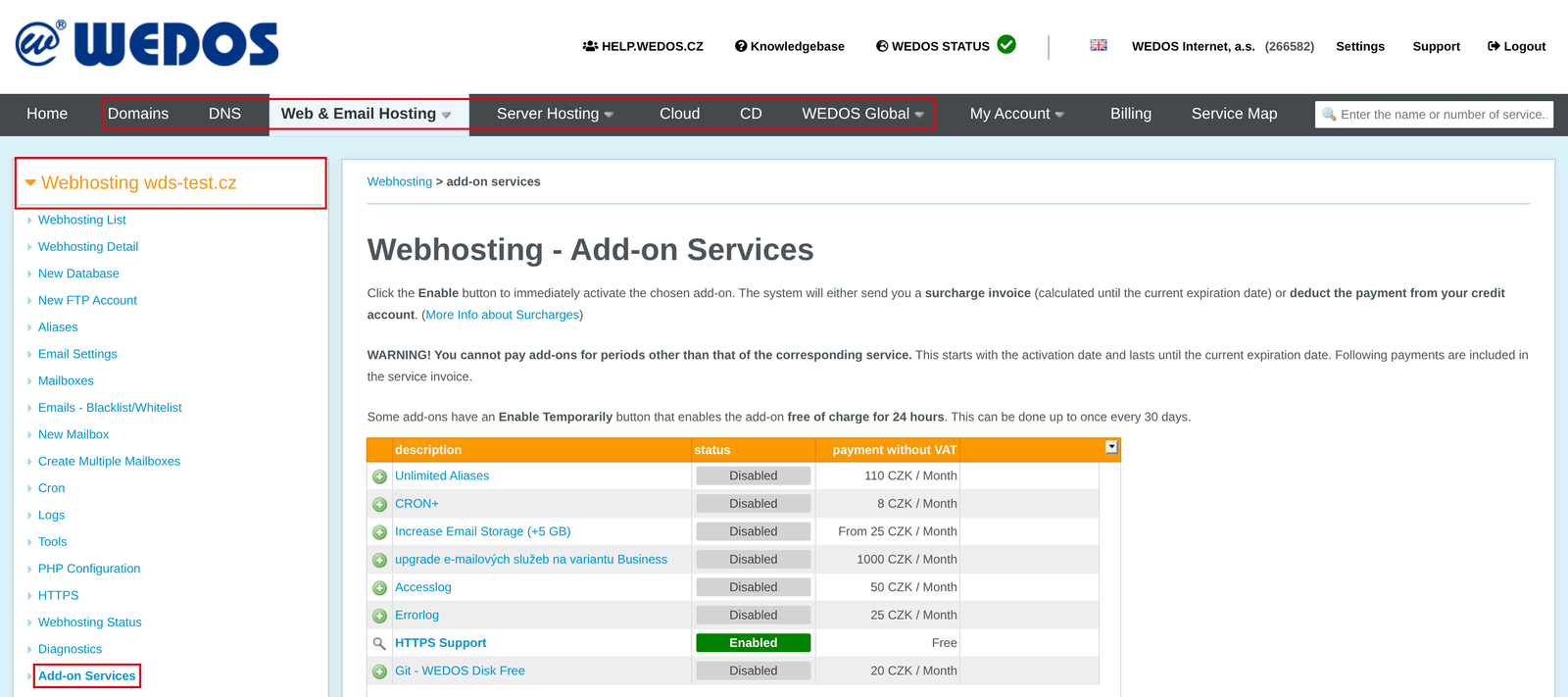
In the control panel, click:
- the link with the Add-on Service name to view detailed information about that Add-on Service;
- the green + button to activate that Add-on Service;
- the magnifying glass button to configure or deactivate that Add-on Service.

Settings take effect within half an hour.
Please note: deactivating and reactivating an Add-on Service causes the system to issue and send a new invoice, regardless of whether it is already paid for the period. If you did this by mistake, dispute the new invoice by replying to the payment request email or using the form ⧉.
We do not refund Add-on Services deactivated after the trial period.
Add-on Service management in Customer Administration is available until the main service expires. After that, ask customer support to make changes using the form ⧉. Provide the service type and name, followed by a list of requested Add-on Service changes.
Add-on Service billing
For Add-on Services, we issue only invoices. The system issues and sends an invoice for an ordered Add-on Service within 1 business day. The due date is shown on the invoice.
From the next billing period, the main service and all Add-on Services are billed together.
If you need to change billing details, do so before paying, following the guide Services – Billing Details and request a corrected document using the form ⧉.

Unpaid Add-on Service invoices
If you do not pay an invoice on time, VEDOS may, in accordance with its General Terms and Conditions suspend the service.
The system normally issues Add-on Service invoices with a 10-day payment term. If an invoice is not paid, the billing department takes over:
- Within a few days (usually 4) after the due date, a WEDOS a.s. billing department employee contacts you with reminder 1, normally asking you to pay the additional invoice within 7 days.
- If you do not respond to the first reminder within 3 business days, a billing department employee sends reminder 2 asking for payment by a specified date.
- If you do not respond to the second reminder either, a billing department employee suspends the service until an agreement is reached on the outstanding charge, usually by payment or cancellation with a proportional reduction of the service’s remaining period.
These times are estimates and may change depending on the billing department’s current workload.
Add-on Service trial period
Add-on Services added in Customer Administration are covered by a 7-day trial period. If you deactivate them again within 7 days of activation, the system automatically cancels the additional invoice.
Common issues
Common Add-on Service issues include:
- Access to Add-on Service management denied
- An Add-on Service cannot be reconfigured or deactivated
- Repeated Add-on Service payment request
- Outdated billing details
- Unordered Monitoring on a Domain
Add-on Service management unavailable
Problem: The Add-on Service management interface displays: To configure an Add-on Service, the service must not be less than 0 days before expiration.
Cause: The system does not allow Add-on Service changes in Customer Administration when the main service is about to expire or has expired. Customer support can make changes based on an authorized request.
Solution: Ask customer support to make the changes using the form ⧉. Provide the main service type and name, followed by a list of requested Add-on Service changes.
An Add-on Service cannot be deactivated
Problem: The Add-on Service details have no deactivation button; an error message appears instead.

Cause: Some Add-on Services cannot be removed because the system contains items enabled by those add-ons, such as mailbox data volume or the number of aliases/CRON tasks.
Solution: Before deactivating an add-on service, make sure the service parameters match the service without that add-on. If the mailbox capacity is full, the increase can only be reduced to a value corresponding to the used space, not removed completely.
If you have cleared mailboxes but the Add-on Service still asks you to reduce email size, contact support ⧉ and request a quota update for the service.
Repeated payment request
Problem: An invoice arrived requesting payment for an Add-on Service that was already paid for.
Cause: The most common cause is deactivating and reactivating the Add-on Service.
Solution: If you deactivated and reactivated an Add-on Service during an already paid period, dispute the new invoice by replying to the payment request email or using the form ⧉.
Outdated billing details
Problem: The billing details are outdated.
Solution: Before paying the Add-on Service invoice, change the service billing details following the guide Services – Billing Details. Then request a corrected document using the form ⧉. Pay only the invoice containing the correct details.
Unordered Monitoring on a Domain
Problem: Monitoring is running on your domain that you did not order, or you are receiving a large number of notification emails from it.
Cause: Monitoring is an add-on service that may have been ordered together with the domain. In the order, the recommended add-on services are often activated in advance.
Solution: Cancel the add-on service in Customer Administration in the add-on services of the domain. If you only want to limit the emails, set the notification types according to the guide EWM – Activation and Basic Control.
Frequently asked questions
Why do you invoice every Add-on Service separately?
The system invoices each add-on service separately when it is ordered, up to the current expiration of the main service. In the following period, it invoices the main service and all active add-on services together.
I canceled an unwanted Add-on Service. Will you refund me?
We do not refund paid Add-on Services, including by transferring the amount to another hosting service.
Can I order hosting and an email space increase on one invoice?
No, the email space increase can only be activated after the service is set up, so a separate invoice is issued. If you want to have everything on one invoice, use a Credit Account, which is billed once a month.