
This article covers DNS records for the Hosting WP service. To set up your domain’s DNS records, follow the instructions in the DNS – Records guide.
In this article you will learn:
- What DNS records does Hosting WP use?
- How to Properly Configure the Hosting WP Service in DNS
- Frequently Asked Questions
DNS Records for Hosting WP
You can find the current DNS records for the Hosting WP service in the service details section of the customer dashboard. You can access them via the link in the service setup email, or by following these steps:
- Log in to the customer administration ⧉.
- In the navigation bar, select Hosting Services > > Hosting WP.
- Select the service from the list for which you want to view the DNS records.
- In the details section, locate the " DNS Record Settings" table.
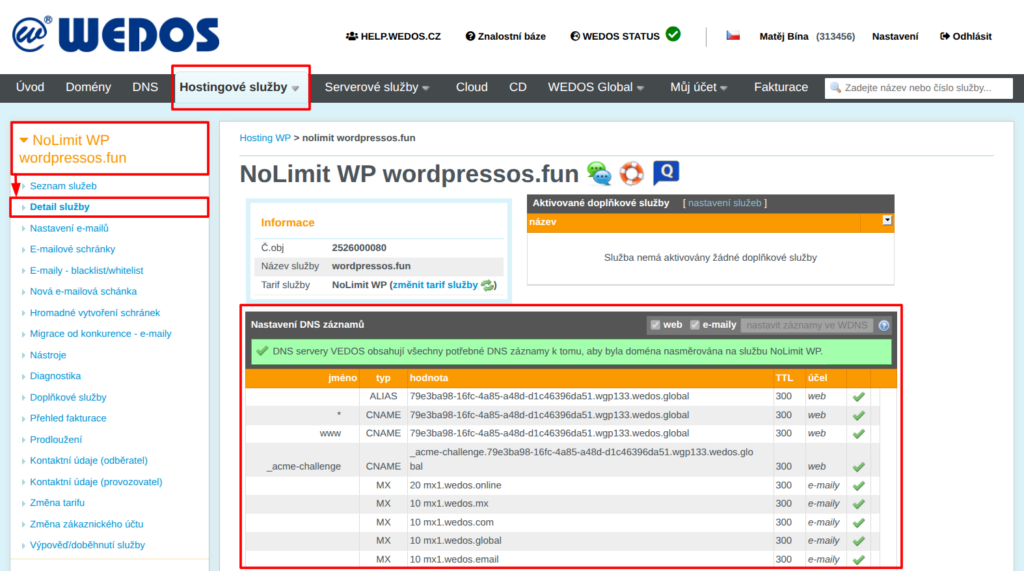
To ensure that the Hosting WP service works properly, please configure your DNS records:
Web logs
The Hosting WP service includes an integrated connection to WEDOS.protection ⧉, which provides:
- Advanced protection against DDoS and hacker attacks, including anonymization of the web server's IP address.
- Caching and distributing content from servers located around the world.
For this reason, Hosting WP uses either A and AAAA records for the proxy server or ALIAS and CNAME records pointing to it.
A and AAAA records only work when using WEDOS DNS. They typically look like this:
Name    TTL    Type    Data
        300    A      ip.4.address.1
        300    A      ip.4.address.2
*        300    A      ip.4.address.1
*        300    A      ip.4.address.2
ALIAS and CNAME records are more versatile, and the system typically selects them when the domain uses WEDOS DNS.
Name            TTL    Type    Data
                300    ALIAS  unique-wgp-id.wgp123.wedos.global
*                300    CNAME  unique-wgp-id.wgp123.wedos.global
www              300    CNAME  unique-wgp-id.wgp123.wedos.global
_acme-challenge  300    CNAME  _acme-challenge.unique-wgp-id.wgp123.wedos.global
These records have the following functions:
- Untitled record: ensures the website functions on the main domain (without "www").
- *, www: ensure the proper functioning of the website on the www subdomain and all others.
- _acme-challenge: allows you to deploy and renew HTTPS certificates (Let’s Encrypt)
MX records
To use Hosting WP email (available for NoLimit WP and Business WP plans), make sure your domain has the correct MX DNS records:
Name    TTL    Type    Data
        300    MX     10 mx1.wedos.mx
        300    MX     10 mx1.wedos.com
        300    MX     10 mx1.wedos.global
        300    MX     10 mx1.wedos.email
        300    MX     20 mx1.wedos.online
Enter records for the main domain without a name. The number preceding the record address indicates the priority.
WP hosting on a subdomain does not support MX records. If you want to use email (also on a subdomain) with this service, please contact ⧉ customer support. Please include the name of the service.
DNS Setup Instructions
To easily configure the DNS settings for the Hosting WP service, we recommend setting the WEDOS DNS servers (NSSET) for your domain, following the instructions in the " Domains – DNS Servers (NSSET)" guide.
The procedure varies depending on the domain's DNS server provider:
WEDOS DNS Settings
WEDOS DNS can be configured automatically from the service details if the records are in the same account as the Hosting WP service, or if this account is an authorized user of those records. If you meet this condition, follow these steps:
- Log in to the customer administration ⧉.
- In the navigation bar, select Hosting Services > > Hosting WP.
- Select the service from the list for which you want to configure DNS records.
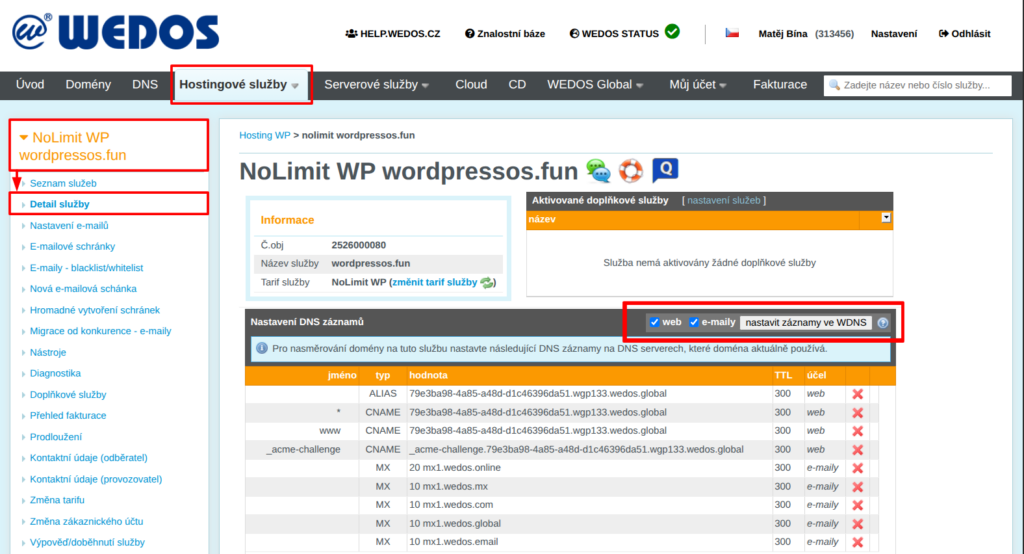
- In the DNS Records Settings table, select whether you want to configure DNS records for your website, email, or both.
- Click the " Set Records" button in WDNS.
If the DNS is not in the same customer account as Hosting WP, and the account in question is not an authorized user, you can at least temporarily transfer it by following the instructions in Services – Transfer Between Accounts or Domains – Transfer Between Accounts using the authorization password.
Settings for another DNS provider
If you cannot change the DNS servers (NSSET) for your domain on WEDOS, enter the records listed in the service details provided by your provider. Please keep the following conditions in mind:
- If your DNS provider does not support ALIAS records for your main domain, try using an ANAME or CNAME record. If neither of these options is available, your website will only work on the www subdomain.
- For MX records, enter all 5 addresses with their corresponding priorities. If you have records for other email providers, delete their MX records.
- Please wait for the records to be processed. This usually takes anywhere from a few minutes to several hours.
Frequently Asked Questions
I accidentally overrode the MX records for my email with another provider using an automated tool. How can I restore them?
Check the correct records with your email service provider, delete the MX records for the Hosting WP service, and set up new ones. If you can’t find the original MX records, review the DNS change history.