
Tento článek řeší zasílání systémových e-mailů z WordPressu. Chcete-li nastavit e-maily služby hosting WP (zřídit nebo migrovat schránky, získat údaje o připojení, atd.), vyhledejte odpovídající článek v Email category.
In this article, you will learn:
WordPress system emails
WordPress normally sends system emails using PHP. However, Hosting WP has its own SMTP server configured, which can better guarantee their deliverability. Service emails, including password reset links, are therefore sent from the address no-reply@mta.XXX.vedos.website, where XXX is a number.
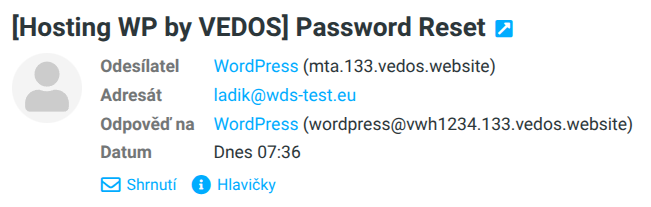
Tento server ve výchozím nastavení zasílá veškerou e-mailovou komunikaci WordPressu, tedy i kontaktní a jiné formuláře, včetně těch nakonfigurovaných pro použití jiného (vlastního) SMTP serveru.
Custom SMTP server
If you want to send emails from WordPress on Hosting WP with your own address (for example, from mailboxes of the NoLimit WP or Business WP service), first configure a custom SMTP server using a WordPress plugin, for example WP Mail SMTP ⧉ (a third-party plugin). You can find the addresses of VEDOS mail servers in the guide Email – SMTP, POP3, IMAP.
If you skip setting up a custom SMTP server before continuing, you risk having system emails blocked, including password changes!
If you have a custom SMTP server reliably set up in your chosen WordPress plugin, switch to it using the following steps:
- Log in to the WordPress administration.
- In the left menu, select Settings General.
- For the item Email (SMTP) select the option Custom SMTP server.
- Click the Save.
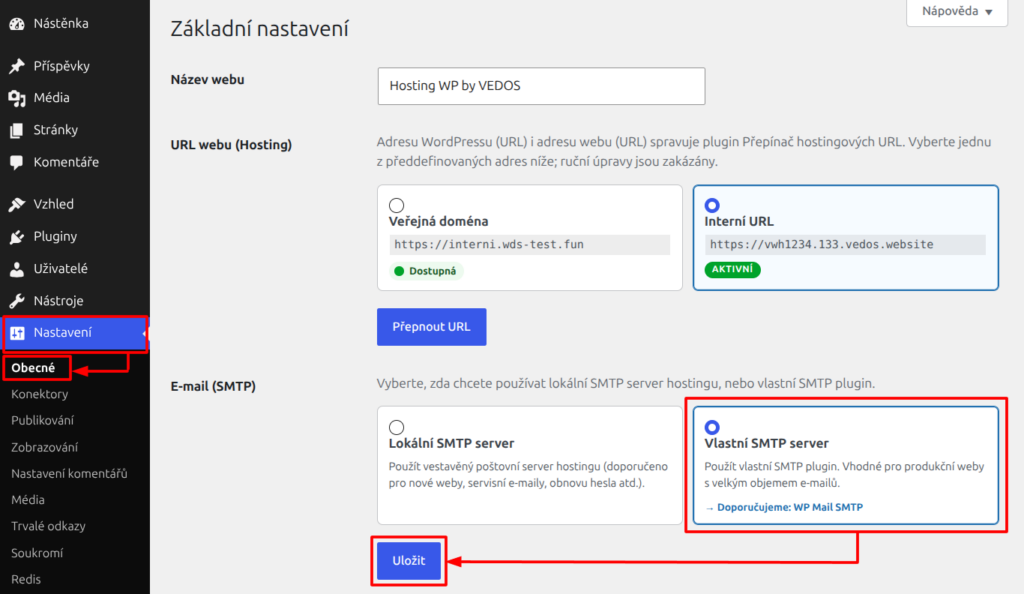
WordPress will now send system and other emails from the configured SMTP server.
Frequently Asked Questions
What should I do if my custom SMTP server does not send emails and I cannot change my WordPress password?
Contact customer support using the form ⧉ and ask to be switched to the local SMTP server.
Můžu jako vlastní SMTP server nakonfigurovat i jiného poskytovatele než VEDOS?
Yes, simply enter the corresponding server addresses and SMTP login details in your chosen WordPress plugin.